Benchmark
Reproducible build / solve / memory comparison between polar-high, linopy, and Pyomo on indexed linear programs, all using HiGHS as the solver. The dense-LP test follows linopy's benchmark, restricted to the linear case so polar-high can run it directly.
The benchmark is a manual artefact, not a CI workflow; runner
variability would make CI numbers misleading. The model code, runner,
and plot script live under
benchmark/
so anyone can re-run on their own hardware in a few minutes.
Headline — dense LP, build-only, single-thread
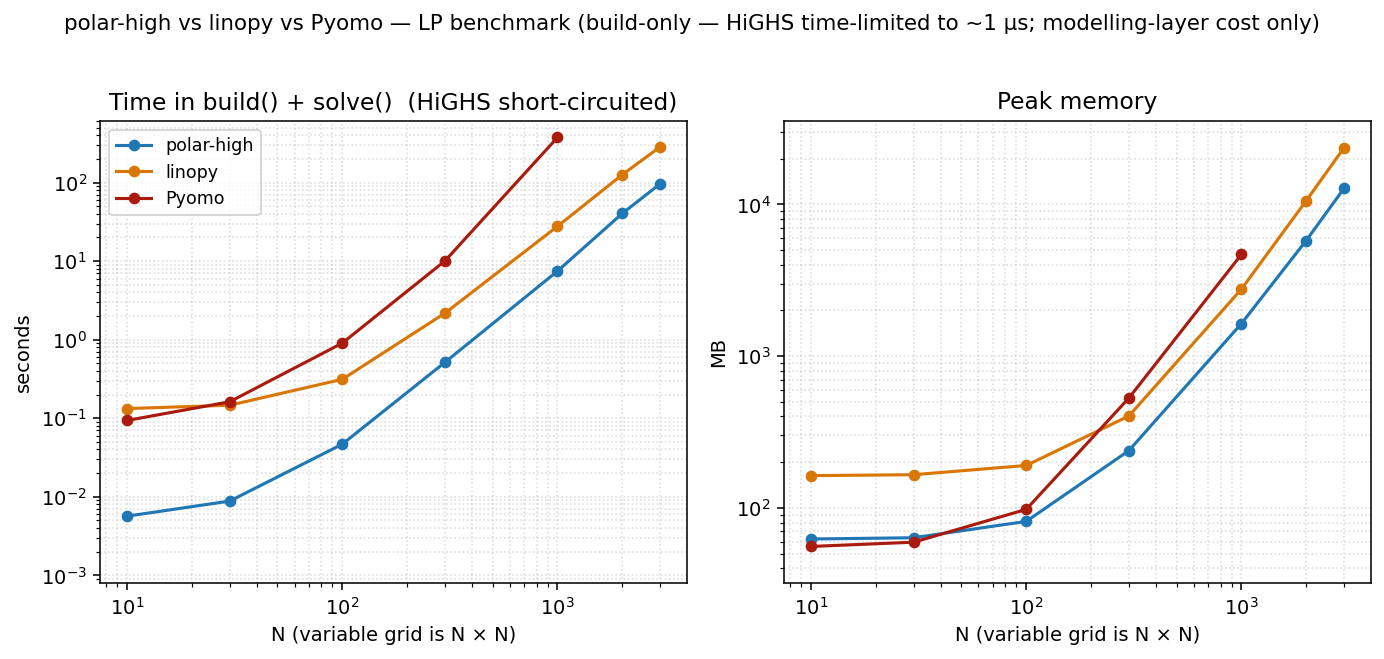
Two panels: total time = build() + solve(), and peak memory.
HiGHS is time-limited to 1 µs so the column reflects pure
modelling-layer cost: what each tool spends turning Python into
something HiGHS can chew on. polar-high and linopy run at
POLARS_MAX_THREADS=1 / OMP_NUM_THREADS=1. Pyomo is
single-threaded by design.
The dense LP that drives this figure (linopy's original model, restricted to LP):
min  Σ_{i,j} (2·x[i,j] + y[i,j])
s.t. x[i,j] - y[i,j] >= i          for i,j ∈ {1,…,N}
     x[i,j] + y[i,j] >= 0          for i,j ∈ {1,…,N}
     x, y >= 0
Variables: 2·N². Constraints: 2·N². Closed-form optimum
obj = N²·(N+1), used as the cross-tool correctness anchor.
polar-high exposes two modes that trade wall time against peak memory (see Two modes below for the mechanics); the headline shows both side by side. At N=3000 (an 18 M-variable LP):
| total time | peak | p50 during solve | post-trim | |
|---|---|---|---|---|
| polar-high (regular, default) | 87 s | 16.4 GB | 10.9 GB | 6.2 GB |
| polar-high (save_memory=True) | 131 s | 15.1 GB | 10.3 GB | 6.2 GB |
| linopy (io_api="lp") | 300 s | 23.7 GB | 2.0 GB | 6.0 GB |
| Pyomo | caps at N=1000 | 4.6 GB at N=1000 | 3.8 GB at N=1000 | 1.9 GB at N=1000 |
Memory numbers are kernel-level cgroup memory.peak — the same
accounting the OOM killer would use against a memory budget. See
Measuring memory below for the column choices. Both polar modes
finish 2.3×–3.5× faster than linopy on this column with peak ~30 %
below linopy; on this cell the regular vs save_memory swap costs
+51 % time for −8 % peak, a much milder shape than on the full HiGHS
solve where it's +59 % time for −15 % peak (see Two modes). Pyomo's
per-coefficient Python overhead makes it unable to keep up past
N≈1000 in our 10-minute timeout.
Two modes: regular (warm-restart) vs save_memory (one-shot)
polar-high supports warm starts and re-solves off the same
Problem (and via WarmProblem for incremental edits without
rebuilding the matrix). That capability requires retaining the
polars / numpy source-of-truth in memory through solve() and after
it returns, and keeping the live Highs instance with its basis
across calls. That's the default (regular) mode. The opt-out is
save_memory=True does two things, in order, right before the
final h.run():
- Drops polar's Python LP source. Every term-side lazy plan,
every Param frame, the caller-side column-bound / cost arrays,
and the Python-side
col_names/row_nameslists are released once HiGHS has copied them. - Disk-roundtrips HiGHS. The model is written to a temporary
MPS file, the original
Highsinstance is cleared and disposed,malloc_trim(0)is called to return glibc's freed arenas to the OS, and a freshHighsis created andreadModel'd from the file. This costs ~+90 s wall time at N=3000 dense full-solve but eliminates the allocator slackaddRowsleaves behind when fed a model incrementally — net ~5 GB lower peak in that cell. The spill file lands in the system temp dir ($TMPDIR//tmp) by default; passsolve(save_memory=True, tmp_dir=...)to redirect it to a specific volume (e.g. the same filesystem as the workspace, or a per-job scratch directory).
After return, a subsequent Problem.solve() raises a clear
RuntimeError. WarmProblem-style updates are also unavailable
(the original Highs with its basis is gone). Solution.col_names
/ row_names are empty (HiGHS still has the names internally,
reachable via Solution.highs if keep_solver=True); name-based
lookups like Solution.constraint_dual("...") won't resolve. None
of this matters for cold-start rolling-horizon loops or scenario
sweeps where each step rebuilds the Problem from scratch — that
remains the supported one-shot pattern.
In regular mode (save_memory=False, the default), polar-high
keeps the source-of-truth around so a follow-up Problem.solve()
or WarmProblem-based update can pick up where the last one left
off without rebuilding the matrix. The cost is the visible RSS
retention shown in the side-by-side table below; the gain is a
free h.run() re-solve from the previous basis.
Side-by-side at the headline cells (polar-high only):
| cell | mode | total time | peak | p50 | post-trim |
|---|---|---|---|---|---|
| dense build-only N=3000 | regular | 87 s | 16.4 GB | 10.9 GB | 6.2 GB |
| dense build-only N=3000 | save_memory | 131 s | 15.1 GB | 10.3 GB | 6.2 GB |
| dense full-solve N=3000 | regular | 148 s | 33.2 GB | 14.9 GB | 1.0 GB |
| dense full-solve N=3000 | save_memory | 236 s | 28.1 GB | 12.0 GB | 5.9 GB |
| network N=10000 build-only | regular | 51 s | 11.5 GB | 7.0 GB | 5.4 GB |
| network N=10000 build-only | save_memory | 94 s | 12.2 GB | 6.9 GB | 5.1 GB |
The trade-off shape varies cell by cell. On the dense full HiGHS
solve the MPS disk roundtrip pays off — HiGHS's addRows allocator
slack is the bulk of peak when it's doing real work, and the
roundtrip flushes it (−15 % peak for +59 % time). On the dense
build-only column the gap is smaller (−8 % peak for +51 % time)
because HiGHS only allocates the matrix once before the time-limit
short-circuit fires, so there's little slack to flush. On the
network LP at N=10000 the disk roundtrip costs more peak than it
saves (+6 % peak for +84 % time) — HiGHS's transient allocations
during this build-only solve are smaller than the temporary MPS
buffer the roundtrip allocates.
Note the real axis here is how much work HiGHS actually does, not
model size. HiGHS's allocator slack only grows during a real solve;
the network N=10000 row above is build-only, so there is nothing for
the roundtrip to flush. A full HiGHS solve on the same model would
likely flip save_memory back to a peak win — we don't show that
cell because a full solve at N=10000 would take long enough to
clutter the benchmark.
The default (regular) gives you warm-restart capability and a
free re-solve from the previous basis on follow-up solve() or
WarmProblem updates, with the visible RSS retention shown above.
save_memory=True opts out of that to lean on peak in cells where
the roundtrip pays.
Measuring memory
The benchmark records five memory metrics per cell. The headline
tables use cgroup_peak_mb; the others answer narrower questions:
| column | what it measures | when it's the right number |
|---|---|---|
cgroup_peak_mb |
cgroup v2 memory.peak over the lifetime of the cell's subprocess (each cell wrapped in its own systemd-run --user --scope) |
how much RAM the kernel had to back this cell — what the OOM killer would charge against a budget |
peak_rss_mb |
ru_maxrss over the whole process |
the process-level high-water mark; usually within a few % of cgroup_peak_mb at large N but ~30–50 % higher at small N because it double-counts shared library pages mapped into the process |
rss_solve_p50_mb |
median RSS while solve() runs (sampled at 25 ms cadence by a sidecar thread) |
steady-state working set during solve, transient setup spikes washed out |
rss_solve_p95_mb |
95th percentile of the same sampler | tail of solve-time distribution; sits between p50 and peak |
rss_after_solve_trim_mb |
RSS right after gc.collect() + malloc_trim(0) once solve() returns |
what the process actually held, with glibc's freed-but-cached arenas returned to the OS |
cgroup_peak_mb is the right answer to "how much RAM do I need to
provision so this doesn't OOM": it counts what the kernel actually
charged the cgroup, not what the process happened to map. It's also
less noisy across reps than ru_maxrss, which is sensitive to
glibc's per-thread arena state and shared-library mapping order. On
this machine the two metrics agree to within a few % at N≥1000;
below that, ru_maxrss is inflated by ~80 MB of lazily-mapped
library pages that cgroup accounting doesn't double-count.
peak_rss_mb and cgroup_peak_mb are both unavoidable peaks — at
the moment of peak consumption every allocated page is in use, so
malloc_trim(0) does not help there. Trim only helps after
deallocation, exposing how much of the apparent "still used" memory
was actually freed but stuck in glibc's per-thread arena cache.
linopy is particularly heavy on arena churn: at N=3000 dense
full-solve it shows ~21 GB resident immediately post-solve, dropping
to ~6 GB after malloc_trim(0) — roughly 15 GB of glibc-retained
pages that aren't really "in use" but ru_maxrss counts them anyway.
Why the memory comparison between tools depends on the column
- cgroup peak captures the kernel's high-water charge across the whole cell, including transient HiGHS-setup scratch and the matrix-assembly intermediates polar-high builds family by family. This is the column to read against an RAM budget.
- p50 (steady-state during solve) captures what's resident
during the bulk of HiGHS's time. Here linopy is low because its
io_api="lp"path serialises the LP to a temp file and frees its xarray side beforeh.run()— only HiGHS's internal sparse copy remains during the hot loop. polar-high undersave_memory=Truedoes an analogous MPS roundtrip but still keepsVar.framemetadata forSolution.value()lookups, so its p50 sits a couple of GB above linopy's. Inregularmode polar-high also keeps the polars source-of-truth live through the solve to enable warm-restart / re-solve, which raises p50 further. - Post-trim is what the process actually holds at end-of-solve with glibc's freed arenas returned to the OS. The difference between this and the cgroup peak is how much allocator churn the cell went through to get there.
Pyomo carries each LP coefficient as a small Python expression-tree
node (a VarData reference plus a multiplier inside a
MonomialTermExpression), roughly 100–200 bytes per coefficient
once CPython overhead is accounted for. polar-high and linopy hold
coefficients as contiguous Arrow / numpy buffers of ~16 bytes per
nonzero. At 4 M nonzeros the representation difference compounds to
the multi-GB gap that's visible against either columnar tool.
The take-away: re-run on your own hardware and look at the column that matches your operational question. Ratios between tools are what's portable across machines — absolute peak numbers shift with glibc behaviour and free-memory pressure.
Reproducing
git clone https://github.com/nodal-tools/polar-high.git
cd polar-high
pip install -r benchmark/requirements.txt
python benchmark/run.py            # ~10 min on a laptop
python benchmark/plot.py           # writes docs/assets/benchmark*.png
benchmark/run.py accepts --sizes, --tools, --threads,
--repeats, --time-limit. Available --tools include polar
(regular mode, the default) and polar_sm (save_memory=True),
plus linopy and pyomo; the network variants are suffixed
_net (e.g. polar_net, polar_sm_net). Each (tool, N) cell
runs in a fresh systemd-run --user --scope subprocess so
cgroup_peak_mb reflects only that cell's allocations and Python
state doesn't carry over. Falls back to plain subprocess if
systemd-run --user isn't available; the cgroup column then ends
up empty and the plots fall back to peak_rss_mb. The plot takes
the median across reps. See
benchmark/README.md
for the methodology details.
Threading: defaults and where it matters
polar-high sets POLARS_MAX_THREADS=1 at import. The data below
shows why.
Scaling with threads at small N
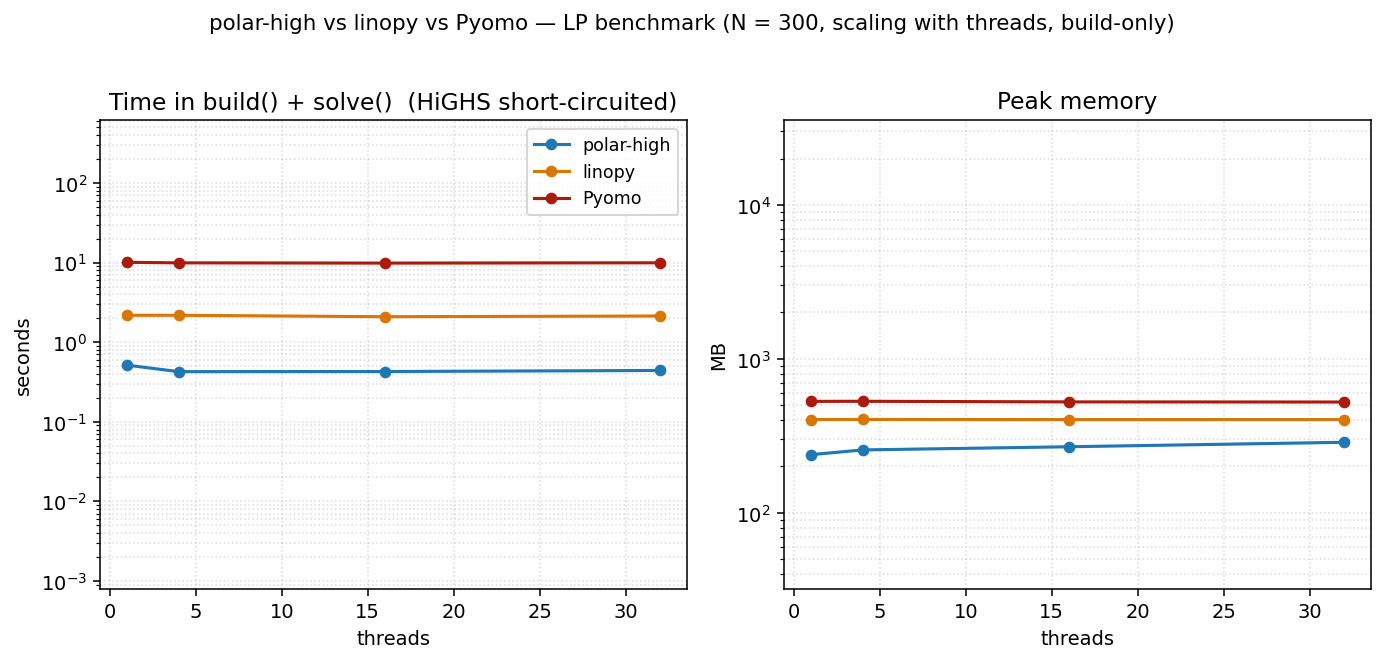
At a small problem size (N=300) the build is too small to amortize Rayon's coordination overhead. All three tools are essentially flat across thread counts. polars's parallelism doesn't pay; linopy and Pyomo are single-threaded by design. polar-high's peak memory rises slightly with threads (per-thread scratch buffers, ~1.5 MB per thread on this LP) without a corresponding time win.
Scaling with threads on a larger LP
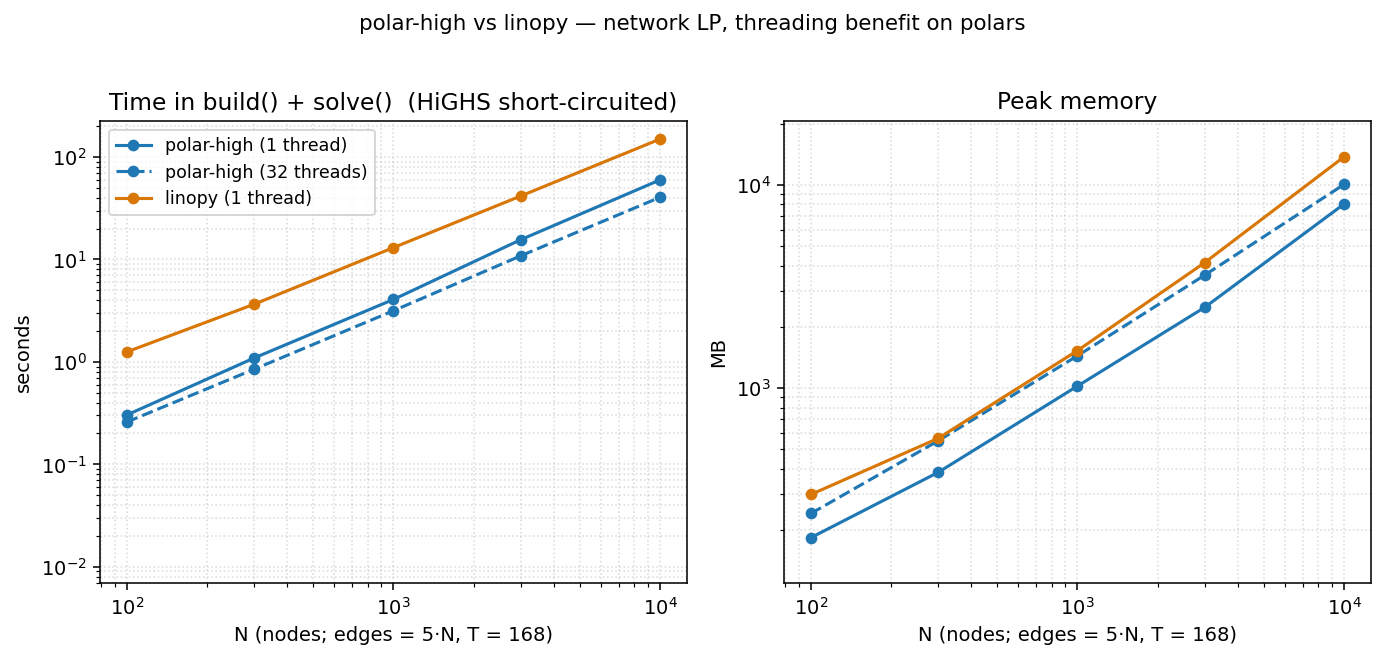
On the network LP (irregular topology, T=168, see below), polar's threading does start paying as N grows:
| N | polar 1 thread | polar 32 threads | speedup |
|---|---|---|---|
| 100 | 0.30 s | 0.29 s | 1.02× |
| 300 | 1.00 s | 0.84 s | 1.20× |
| 1 000 | 3.99 s | 3.24 s | 1.23× |
| 3 000 | 13.3 s | 10.7 s | 1.24× |
| 10 000 | 53.7 s | 38.5 s | 1.40× |
The default (regular mode, save_memory=False) is what these
numbers use; in save_memory=True the MPS write+read disk
roundtrip is a serial step that doesn't benefit from threading
(Amdahl's law in action) and the speedup is smaller. At threads=32,
polar's peak grows ~15 % above threads=1 (per-thread polars/Rayon
scratch and a wider arena footprint). The takeaway:
- Default threads=1 is the right choice for typical workloads. Faster and leaner on small/medium LPs; only modestly slower than threads=32 even at large N.
- Override to threads=N by setting
POLARS_MAX_THREADSbefore importing polar-high. Worth doing for genuinely large indexed LPs where you've checked that the polars-side build is the bottleneck.
Network LP: irregular topology
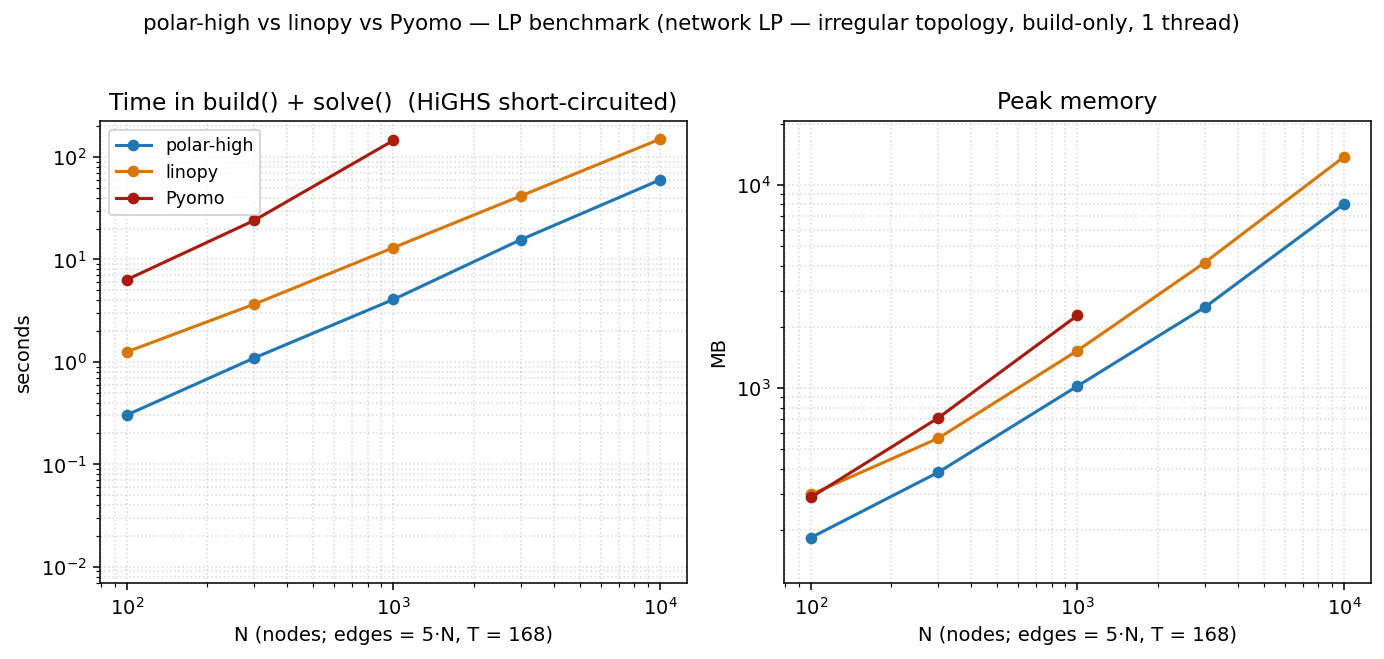
The dense N × N headline above is the model linopy's benchmark
uses, and it's flattering to xarray: every cell has the same shape,
indexing is rectangular, and dense numpy arrays compress the
coefficient matrix. Real indexed LPs (energy systems, supply chains)
aren't shaped that way. They have irregular topology: flow
variables on edges, balance constraints on nodes, with an edge→node
lookup that varies per node.
The network LP captures that:
N nodes, E = 5·N edges drawn at random (Hamiltonian cycle + 4·N random),
T = 168 time steps (one week of hours)

vars     flow[e, t] >= 0
cstr 1   flow[e, t] <= cap[e, t]                                  ∀ (e, t)
cstr 2   Σ_{e: dst[e]=n} flow[e,t] − Σ_{e: src[e]=n} flow[e,t]
                                            == demand[n, t]       ∀ (n, t)
obj      min Σ cost[e] · flow[e, t]
The node-balance constraint requires an edge→node lookup. polar-high
expresses this as a polars join (Where(flow, edges_dst_n)); linopy
uses flow.groupby(dst_array).sum(); Pyomo precomputes
incoming[n] adjacency dicts and iterates them. Each idiom is
natural to its tool.
At N=10 000 (≈ 8.4 M variables, ≈ 10 M constraints):
| total time | peak | p50 during solve | post-trim | |
|---|---|---|---|---|
| polar-high (regular, default) | 51 s | 11.5 GB | 7.0 GB | 5.4 GB |
| polar-high (save_memory=True) | 94 s | 12.2 GB | 6.9 GB | 5.1 GB |
| linopy (io_api="lp") | 165 s | 14.1 GB | 1.6 GB | 4.0 GB |
| Pyomo | timed out at N=3000 | — | — | — |
polar (regular) is ~3.2× faster than linopy at this cell with peak
~18 % below linopy. save_memory=True doesn't help here — it ends
up slightly higher on peak than regular and ~1.8× slower —
because the MPS-roundtrip's transient buffer costs more than
HiGHS's allocator slack saves on a build-only run. The p50 column
still favours linopy because of its file-roundtrip — linopy
serialises the LP to a temp file and HiGHS reads it back, so
linopy's Python-side representation is gone by the time HiGHS is in
its hot loop. polar-high under save_memory=True does an
analogous MPS roundtrip but still keeps its Var.frame metadata
for Solution.value() lookups — slightly more residual than
linopy's pure file-handoff. Pyomo can't finish at this scale inside
our 10-minute timeout.
Replication: linopy's original benchmark format
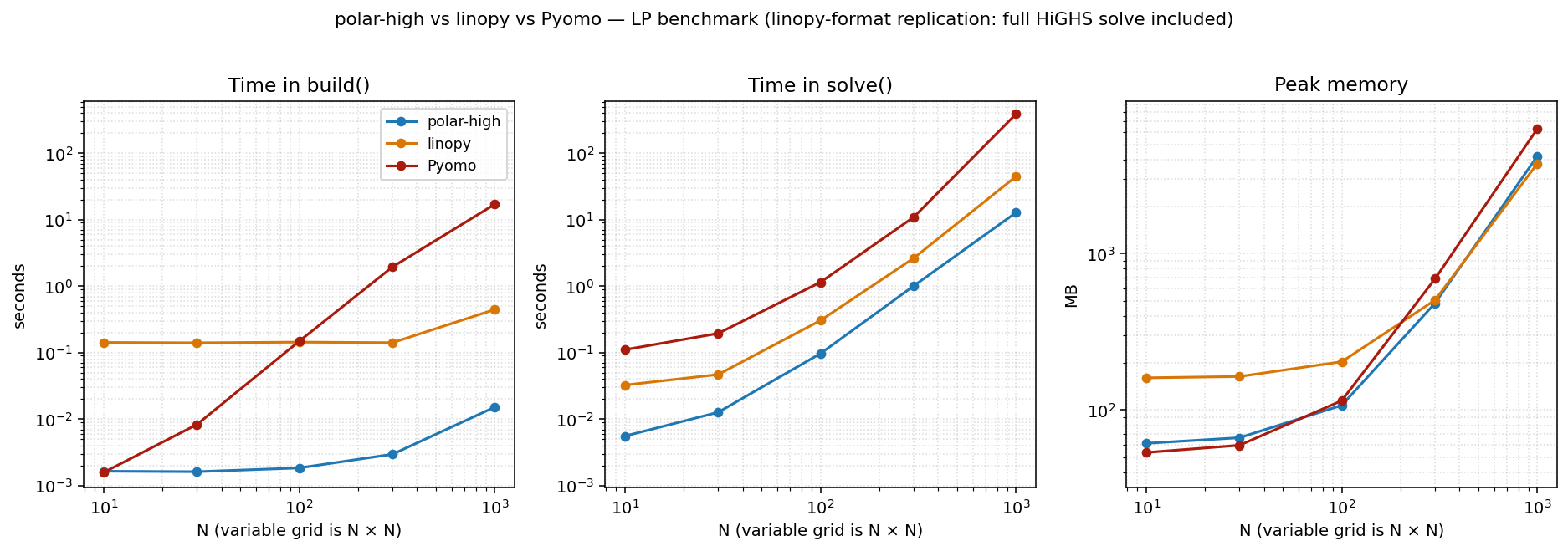
This is the same dense LP at threads=1 in the linopy benchmark's original three-panel format: build / solve / memory shown separately, with the full HiGHS solve included (no time limit). We include it for direct visual comparison with linopy's published numbers and as the methodology footnote.
Caveat: read with care. The build() / solve() split is not
an apples-to-apples decomposition across tools. Each library draws
the boundary in a different place:
- polar-high's
build()registers metadata only. The matrix assembly happens insidesolve()alongside the HiGHS call. - linopy's
build()materialises xarray coefficient arrays eagerly;solve()writes them to an LP file and hands it to HiGHS. - Pyomo's
build()instantiatesVarData/ConstraintData/MonomialTermExpressionPython objects per coefficient. Most of the work happens here;solve()walks the expression tree to emit the LP.
So when you compare the build column between tools, you're
comparing what each tool chose to put in build(). The
apples-to-apples cross-tool measurement is build() + solve(),
which is the headline figure at the top of this page.
That said, the replication is faithful: the closed-form objective is hit exactly, the model is the same LP, and HiGHS solves the same sparse matrix. linopy's numbers reproduce within run-to-run noise.
Fairness caveats
- Each tool builds the LP in its own natural style; the closed-form objective (or cross-tool agreement on the network LP) confirms they're all solving the same problem.
- Pyomo's solve uses the
appsi_highspersistent-solver interface, the fastest Pyomo→HiGHS path. The file-basedSolverFactory("highs")route would inflate Pyomo's solve time with LP-write/reread overhead. - linopy uses
io_api="lp"explicitly: the configuration where ourtime_limitshort-circuit reliably reaches HiGHS for the build-only test. linopy'sio_api="direct"is faster on full solves but interacts awkwardly with the time-limit short-circuit. - polar-high's solve calls into
highspydirectly with no intermediate file in either configuration. - HiGHS itself stays at 1 thread across all tools, so the solve column remains apples-to-apples.
- Each
(tool, N)cell runs in a fresh Python process, so caches and memory don't carry over between cells. Python startup costs ~50 ms per cell, negligible at our sizes. - One machine, one Python version, one HiGHS version. Re-run on your own hardware before reading too much into the absolute numbers; the ratios between tools are what's portable.
What's not in the benchmark
- MIP, QP, warm starts, and decomposition (cutting-plane / Benders). The benchmark deliberately exercises the matrix-assembly path on plain LPs.
- JuMP and gurobipy. Both have toolchain or licence friction
that defeats "anyone can re-run from a clean
pip install".
If you'd like a different model class (block-angular, time-coupled, mixed-integer with branching) in the benchmark, open an issue.